An app blocker you can’t skip.
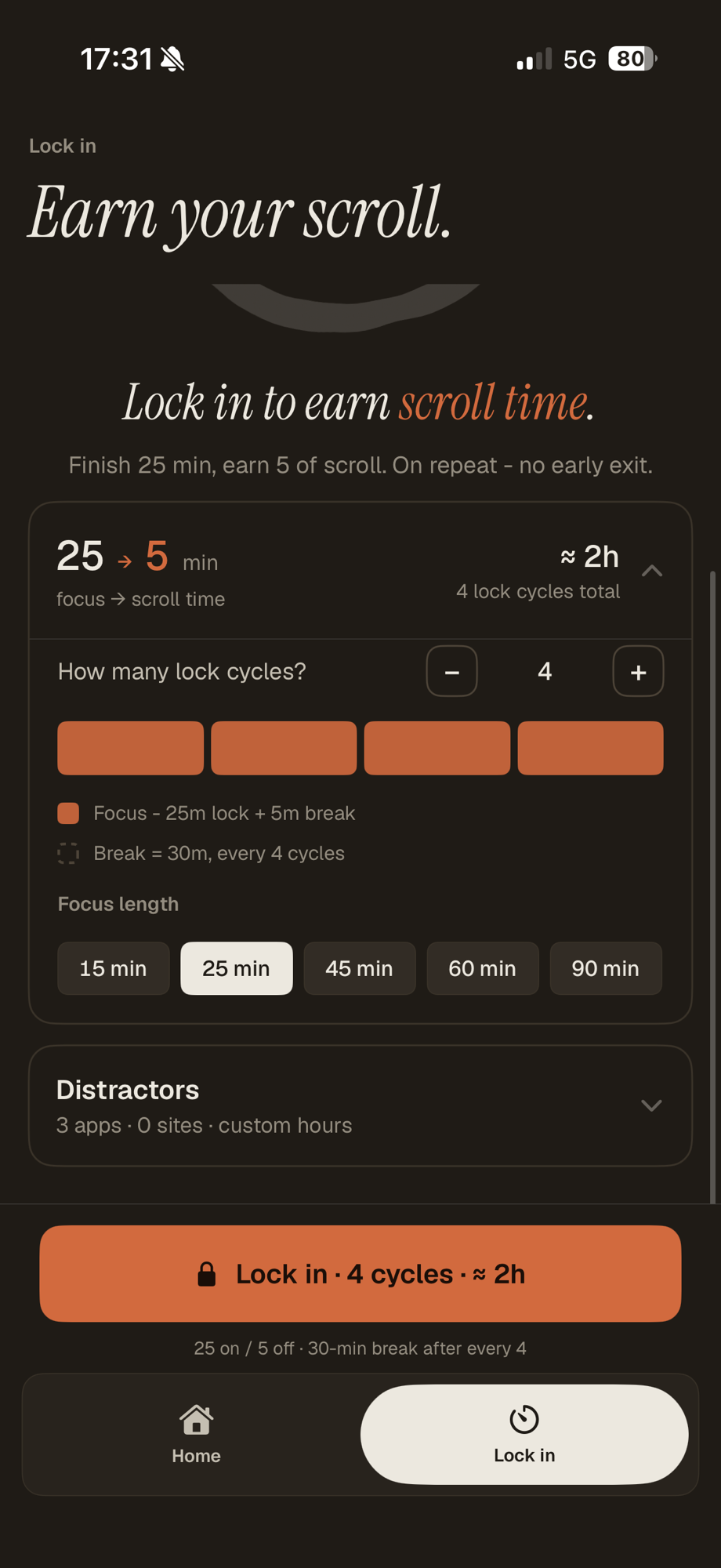
Most strict blockers leave a back door - an Ignore Limit, a skip button, a quick uninstall. Soren’s lock-in closes it: once a session starts, there is no pause, no skip, no early exit. It runs entirely on your iPhone, with no account.

Private by design - nothing leaves your iPhone
No iPhone blocker is truly impossible to remove.
So we don’t pretend otherwise. What the lock-in guarantees is narrower and more useful: once a session starts, you can’t pause it, skip it, or exit early. The escape hatch you’d reach for in the moment is gone.
Why most blockers
leave a door open.
Almost every “strict” blocker has a polite exit - the one you use at the worst possible moment.
The Ignore Limit
Apple’s own Screen Time blocks an app, then offers “Ignore Limit” right on the block screen. One tap and the limit is gone for the day.
The skip button
Timer and tree apps let you end a session the second the urge hits. Tap “Give Up” and the block is over - exactly when you needed it most.
The uninstall
Delete the app and the block goes with it. Uninstall-protection toggles lean on a Screen Time setting you can usually unwind yourself.
How it
holds.
System-level blocking through Apple’s own frameworks, with no exit button while a session runs.
System-level, not an overlay
The lock-in blocks through Apple’s Screen Time and Family Controls - the frameworks behind parental controls - so apps and sites are shielded by iOS, not a layer you can swipe away.
No pause, skip, or exit
Once a session starts it runs to the length you set. The block screen never offers an Ignore Limit, because Soren does not expose one. You decide once, while clear-headed.
Blocks Safari too
It shields websites alongside apps, so youtube.com closes when the YouTube app does. No slipping out through the browser while the lock-in is up.
Strict iPhone app blockers,
side by side.
Just the strict-block decision. For the full ranked review, read Soren vs Forest, Opal and the rest.
| App | No account? | Can’t exit mid-session? | Blocks websites? | Private (on-device)? | Scores sleep? | Scores activity? |
|---|---|---|---|---|---|---|
| Soren | Yes | Yes - no pause / skip / exit | Yes (Safari) | Yes - on-device | Yes | Yes |
| Opal | No | Partly - Deep Focus locks | Yes | Account / cloud sync | No | No |
| Freedom | No | Partly - Locked Mode resists | Yes | Account / cloud sync | No | No |
| one sec | Yes | Partly - pause by default | Yes | Yes | No | No |
| ScreenZen | Yes | Partly - optional strict block | Yes | Yes | No | No |
| AppBlock | Optional | Partly - Strict Mode resists | Yes | Mostly on-device | No | No |
No account. No servers.
On-device.
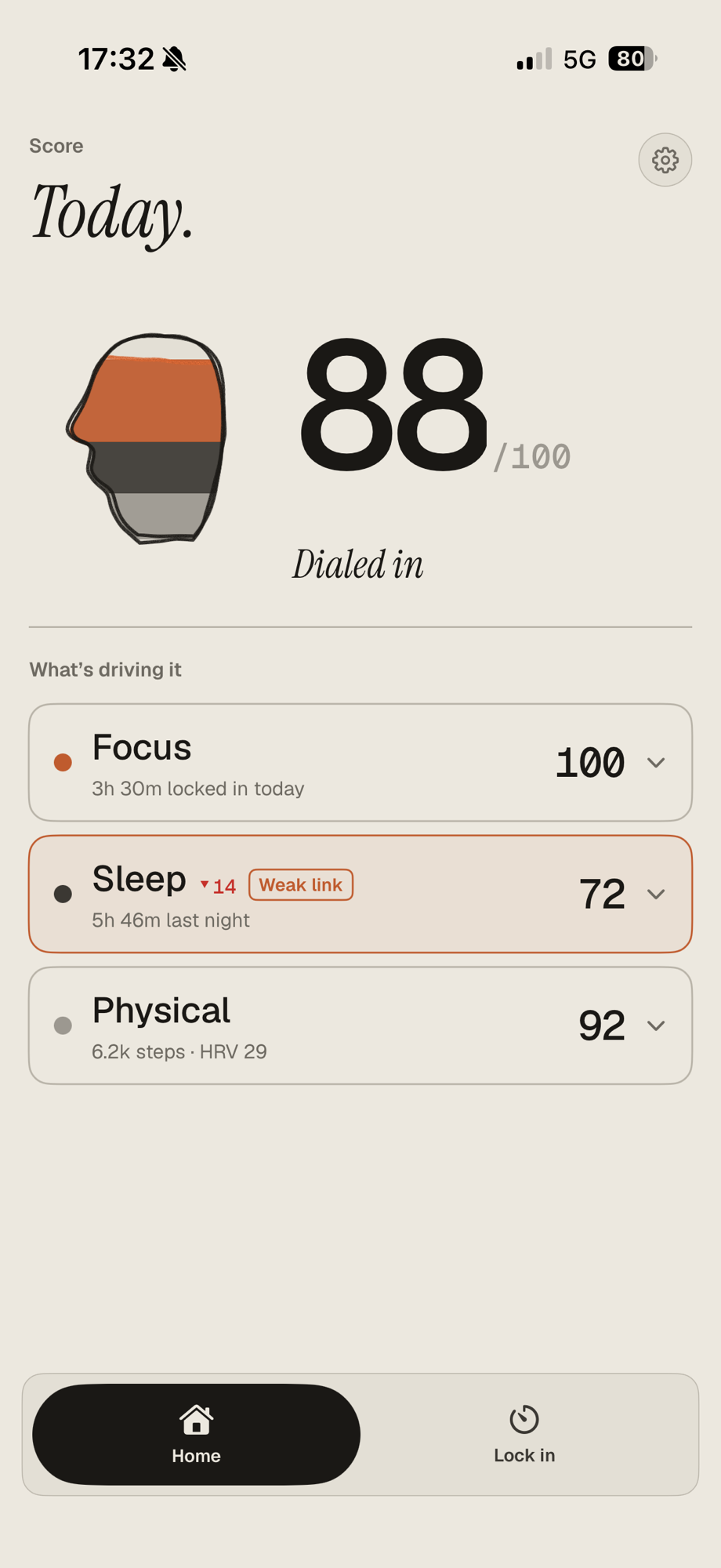
The block is the means, not the end - and none of it leaves your phone.
No account, ever
Nothing to sign up for. You don’t hand over an email or a login just to block your own apps.
Nothing leaves your phone
No servers, no trackers. Your blocklist, your sessions and your Soren Score are computed and kept on your iPhone.
It scores sleep and activity too
The block is one input. Soren also scores your sleep, estimated from your phone, and your daily activity, folded into one number.
Strict blocking,
answered straight.
What “can’t be bypassed” really means on iPhone, and where a software lock hits its ceiling - short answers, no spin.
Is there an app blocker that can’t be bypassed on iPhone?
Not entirely - no iOS app can make itself impossible to remove. What is real is a blocker you can’t bypass mid-session: Soren’s lock-in locks apps and websites through Apple’s Screen Time for a length you choose, with no pause, skip, or early exit while it runs.
What’s the best strict app blocker for iPhone?
Soren needs no account, runs entirely on your iPhone, and adds a daily 0-100 Soren Score on top of the block. ScreenZen and AppBlock are other options worth knowing, though their strict modes are optional rather than the default.
How do I get rid of the Ignore Limit button on Screen Time?
You can’t remove it from Apple’s own Screen Time - it always offers “Ignore Limit” on the block screen. Soren’s lock-in never exposes one: for the length of a session there is no button to tap.
Can you make an app blocker you can’t turn off or delete?
You can make one you can’t turn off mid-session - that is the lock-in - but not one that is truly undeletable, because iOS does not allow a permanent app. Real blockers remove the in-the-moment escape rather than claiming to be undeletable.
How is Soren different from Opal or Freedom?
Opal and Freedom are account-based and sync your data through their cloud so blocking follows you across devices. Soren needs no account and runs entirely on your iPhone: no cross-device sync, but no central store of your focus data either, plus a hard in-session lock and a daily score.
Does Soren block websites as well as apps?
Yes. The lock-in works through Screen Time, so it shields Safari websites alongside apps - you can block YouTube the app and youtube.com the website in the same session.
Does Soren need an account or send my data anywhere?
No. There is no account to create and no server of Soren’s to send anything to - the lock-in, your Soren Score and sleep tracking all run on your iPhone (iOS 17+).
The lock you can’t talk your way out of.
A private iPhone app blocker that holds for the whole session - plus a daily Soren Score that also reads your sleep and activity. iOS 17+.
How your data’s handled →